Authenticator2.1.2
Publisher Description
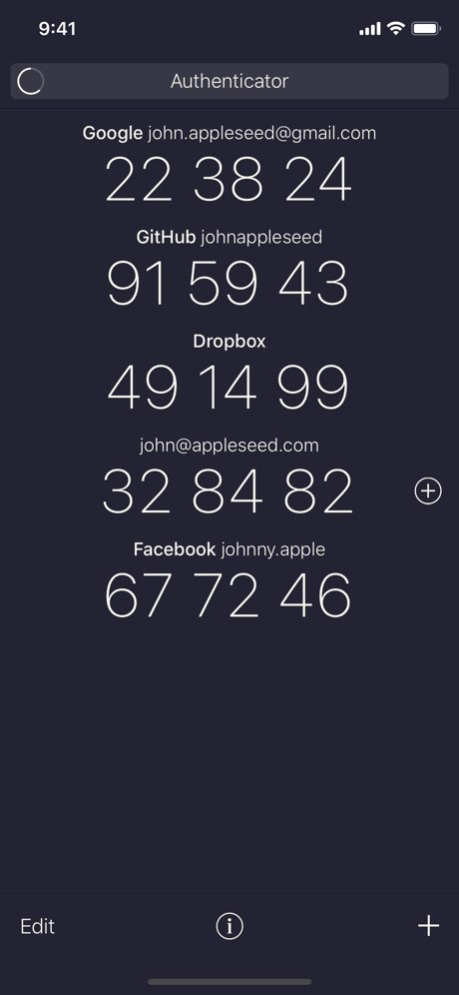

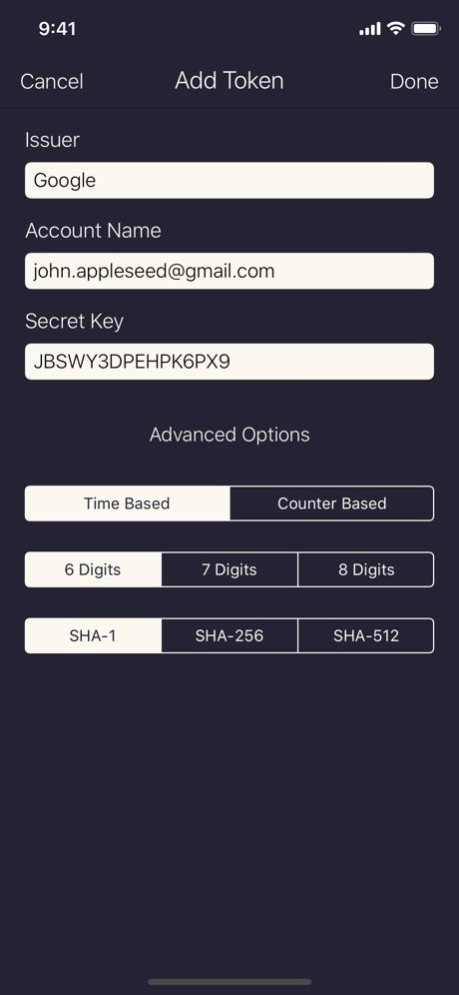
Authenticator is a simple, free, and open source two-factor authentication app. It helps keep your online accounts secure by generating unique one-time passwords, which you use in combination with your other passwords to log into supporting websites. The simple combination of the password in your head and the rotating passwords generated by the app make it much harder for anyone but you to access your accounts.
. Easy: Simple setup via QR code, "otpauth://" URL, or manual entry
. Secure: All data is stored in encrypted form on the iOS keychain
. Compatible: Full support for time-based and counter-based one-time passwords as standardized in RFC 4226 and 6238
. Off the Grid: The app never connects to the internet, and your secret keys never leave your device.
Version History This update fixes a crash that could occur when trying to manually enter a token on a 32-bit device (iPhone 5 or earlier). 2.1.2 06/01/2019 For users on iOS 12.2 and above, the app binary size has been reduced by more than 85%. 2.1.1 04/26/2019 • Added a new menu where a user can select whether they prefer passwords shown in groups of two digits or groups of three.
• Fixed a user interface bug that could occur after a user declined the app's request for camera access. 2.1.0 03/08/2019 • Added an alert to ask the user for confirmation before permanently deleting a token. 2.0.5 09/19/2018 This release fixes an issue that was causing the app to crash on launch for some users. 2.0.4 04/29/2018 • Disabled swipe-to-delete on the token list, to prevent tokens from being accidentally deleted. To delete a token, first tap "Edit" and then tap the red delete button.
• Fixed a bug where the app might crash when adding a token from an "otpauth://" URL. 2.0.3 04/26/2018 • Improved the accessibility of manual token entry when using VoiceOver
• Improved app efficiency, reducing energy usage and processor load by over 95% 2.0.2 12/11/2017 • Added support for iPhone X
• Fixed a bug where tokens were sometimes copied when trying to scroll the token list
• Fixed button text color and font weight on iOS 11 2.0.1 11/07/2017 ○ Search & Filter
Tap the new search field at the top of the token list to filter your tokens by issuer and account name.
○ Easier to Read
An updated font, improved typography, and better spacing make your passwords easier to read.
○ Security & Backup Info
For security reasons, tokens are stored only on one device, and are not included in iCloud or unencrypted backups. More information about security and backups has been added in the app.
Also…
• Haptic Feedback
• Improved Error Messages
• Many small improvements to polish and performance… 2.0.0 06/08/2017 [NEW] Support for larger screen sizes.
[FIX] Moved token type to the advanced options section.
If you find Authenticator useful, please take the time to rate it on the App Store! If you have any issues or other feedback, you can contact the developer at http://mattrubin.me/authenticator/ or on Twitter @_mattrubin. 1.1.2 09/29/2014 If you find Authenticator useful, please take the time to rate it on the App Store! If you have any issues or other feedback, you can contact the developer at http://mattrubin.me/authenticator/.
[NEW] Advanced options: choose the algorithm and digit count in manual token entry. 1.1.1 06/22/2014 If you find Authenticator useful, please take the time to rate it on the App Store! If you have any issues or other feedback, you can contact the developer at http://mattrubin.me/authenticator/.
[NEW] Updated visual design.
[NEW] Dedicated editing screen.
[NEW] Default to QR code entry when the camera is available. (Manual token entry is still possible.)
[NEW] Allow the user to specify an issuer string when manually entering a token.
[ETC] Assorted minor improvements. 1.1 05/09/2014 [NEW] Added an "Issuer" field for labeling tokens.
[FIX] Removed support for MD5-based tokens.
[FIX] Fixed a bug where token edits could be reverted if the password refreshed while editing. 1.0.3 12/24/2013 [FIX] Fixed a bug which prevented adding new tokens after a clean install.
[NEW] Tokens which remain in your keychain after the app is uninstalled are now recovered when the app is reinstalled. 1.0.2 12/09/2013 1.0.1 12/03/2013
About Authenticator
The company that develops Authenticator is Matt Rubin. The latest version released by its developer is 2.1.2.
To install Authenticator on your iOS device, just click the green Continue To App button above to start the installation process. The app is listed on our website since 2026-10-14 and was downloaded 20 times. We have already checked if the download link is safe, however for your own protection we recommend that you scan the downloaded app with your antivirus. Your antivirus may detect the Authenticator as malware if the download link is broken.
How to install Authenticator on your iOS device:
- Click on the Continue To App button on our website. This will redirect you to the App Store.
- Once the Authenticator is shown in the iTunes listing of your iOS device, you can start its download and installation. Tap on the GET button to the right of the app to start downloading it.
- If you are not logged-in the iOS appstore app, you'll be prompted for your your Apple ID and/or password.
- After Authenticator is downloaded, you'll see an INSTALL button to the right. Tap on it to start the actual installation of the iOS app.
- Once installation is finished you can tap on the OPEN button to start it. Its icon will also be added to your device home screen.
Program Details
System requirements
Download information
Pricing
Version History
version 2.1.2
posted on 2026-10-14
Version History This update fixes a crash that could occur when trying to manually enter a token on a 32-bit device (iPhone 5 or earlier). 2.1.2 06/01/2019 For users on iOS 12.2 and above, the app binary size has been reduced by more than 85%. 2.1.1 04/26/2019 • Added a new menu where a user can select whether they prefer passwords shown in groups of two digits or groups of three.
• Fixed a user interface bug that could occur after a user declined the app's request for camera access. 2.1.0 03/08/2019 • Added an alert to ask the user for confirmation before permanently deleting a token. 2.0.5 09/19/2018 This release fixes an issue that was causing the app to crash on launch for some users. 2.0.4 04/29/2018 • Disabled swipe-to-delete on the token list, to prevent tokens from being accidentally deleted. To delete a token, first tap "Edit" and then tap the red delete button.
• Fixed a bug where the app might crash when adding a token from an "otpauth://" URL. 2.0.3 04/26/2018 • Improved the accessibility of manual token entry when using VoiceOver
• Improved app efficiency, reducing energy usage and processor load by over 95% 2.0.2 12/11/2017 • Added support for iPhone X
• Fixed a bug where tokens were sometimes copied when trying to scroll the token list
• Fixed button text color and font weight on iOS 11 2.0.1 11/07/2017 ○ Search & Filter
Tap the new search field at the top of the token list to filter your tokens by issuer and account name.
○ Easier to Read
An updated font, improved typography, and better spacing make your passwords easier to read.
○ Security & Backup Info
For security reasons, tokens are stored only on one device, and are not included in iCloud or unencrypted backups. More information about security and backups has been added in the app.
Also…
• Haptic Feedback
• Improved Error Messages
• Many small improvements to polish and performance… 2.0.0 06/08/2017 [NEW] Support for larger screen sizes.
[FIX] Moved token type to the advanced options section.
If you find Authenticator useful, please take the time to rate it on the App Store! If you have any issues or other feedback, you can contact the developer at http://mattrubin.me/authenticator/ or on Twitter @_mattrubin. 1.1.2 09/29/2014 If you find Authenticator useful, please take the time to rate it on the App Store! If you have any issues or other feedback, you can contact the developer at http://mattrubin.me/authenticator/.
[NEW] Advanced options: choose the algorithm and digit count in manual token entry. 1.1.1 06/22/2014 If you find Authenticator useful, please take the time to rate it on the App Store! If you have any issues or other feedback, you can contact the developer at http://mattrubin.me/authenticator/.
[NEW] Updated visual design.
[NEW] Dedicated editing screen.
[NEW] Default to QR code entry when the camera is available. (Manual token entry is still possible.)
[NEW] Allow the user to specify an issuer string when manually entering a token.
[ETC] Assorted minor improvements. 1.1 05/09/2014 [NEW] Added an "Issuer" field for labeling tokens.
[FIX] Removed support for MD5-based tokens.
[FIX] Fixed a bug where token edits could be reverted if the password refreshed while editing. 1.0.3 12/24/2013 [FIX] Fixed a bug which prevented adding new tokens after a clean install.
[NEW] Tokens which remain in your keychain after the app is uninstalled are now recovered when the app is reinstalled. 1.0.2 12/09/2013 1.0.1 12/03/2013
version 2.1.2
posted on 2019-06-01
This update fixes a crash that could occur when trying to manually enter a token on a 32-bit device (iPhone 5 or earlier).
version 2.1.2
posted on 2019-06-01
Jun 1, 2019
Version 2.1.2
This update fixes a crash that could occur when trying to manually enter a token on a 32-bit device (iPhone 5 or earlier).
